Salon Reports: Payments, Appointments and Clients
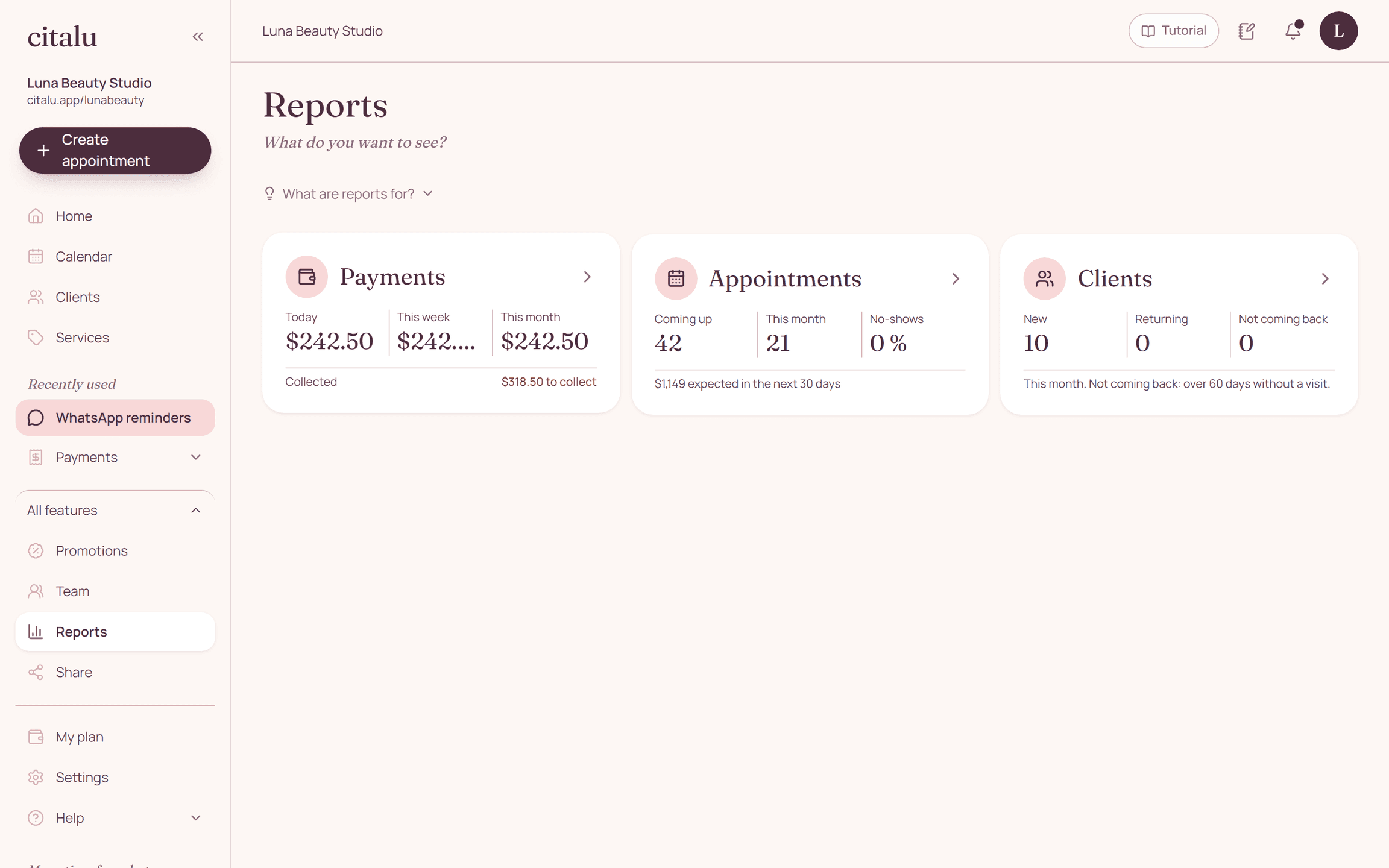
Citalu's reports answer three questions: how much you collected, which appointments are coming up and what is happening with your clients. Each button shows its numbers on the outside. Open it to see the detail by day, week or month.
By the Citalu team
Payments: what came in and what is still owed
The Payments button shows what you collected today, this week and this month, plus what is still left to collect this month. The amounts come from appointments marked "Showed up". Inside, you see each day, the total by payment method and the appointments that still have no payment method.
Appointments: what is coming up and who did not show
The Appointments button counts the bookings for the next 30 days, the ones this month and your no-show rate. It also shows the expected amount of the appointments coming up. That way you spot a slow week early and can offer open times before it arrives.
Clients: new, returning and not coming back
The Clients button splits new clients this month, returning clients and the ones who have not come in for more than 60 days. That last list is worth checking every week so you can send them a message. Detailed reports filter by period and by staff member, and you can download them as CSV.
How to put it into practice
- Mark "Showed up" on each appointment when it ends and add the payment method.
- Open Reports and choose Payments, Appointments or Clients.
- Check the list of clients who are not coming back and message them.
Frequently asked questions
Are reports included in every plan?
Yes. Payments, Appointments and Clients are in the Solo, Estudio and Salón plans.
Where do the amounts come from?
From appointments marked "Showed up", with the price and the payment method you recorded. An appointment without "Showed up" does not count as collected.
Can I see the numbers for each staff member?
Yes. In the detailed reports you choose the period and the staff member. Each report downloads as CSV so you can open it in Excel or Google Sheets.
Does it replace bookkeeping or invoicing?
No. Reports show what happens on your schedule. Citalu does not issue tax invoices or track inventory.
Bring that order to your schedule
Try Citalu with your services and hours. You get 14 days free to see if it fits your business.